Tuesday, February 12, 2008

Design Ideas 2 - Visual Mixer

This is our intitial idea for the project.We hope to have this on a table in the cafe. The fidgets we intend to use are touch sensors, vibration sensors, sliders, a joystick and a light sensor. We will use Actionscript 3.0 scripting to link the fidgets to the computer screen (which in reality would be the table in the cafe). When the fidgets are activated there will be 4 short animations which can be mixed visually because they will be able to overlap. The slider in the middle will alter the colour of all the animations. We will either make the animations opaque or just quite sparse so they will be able to mix smoothly.

The picture in the middle of this diagram is taken from this website:
www.wellcomecollection.org/exhibitionsandevents/onlineexhibits/index.htm


It is made in a similar way to how we would like our first animation to look, although we would make it look more like smarties falling and put the circles in different colours and not have any text.

Design Ideas

Today things started to get exciting for Morag and I in our project as we made quite a few significant decisions.

The brief is to 'Design and present your ideas and working prototype for an interactive kiosk/advertising with AV content'.

We decided to make our kiosk for is the cultural industry, inside an art gallery’s cafe. We will not be conveying information via our kiosk; neither will we be advertising a product. Our kiosk is purely for the purpose of art, to incorporate interaction into the gallery café.

Sometimes café’s are a let down for the gallery as they provide no inspiration for the customers. They are usually just clean and clinical looking with no real thought behind the decoration, and often quite overpriced.

However with our idea, we propose to add something a little more exciting to the experience and hope to continue the creative sparks flying before the customer leaves the gallery.

Thursday, January 31, 2008

Interactive Kiosks


The photographs above are a few interactive kiosks I found around Nottingham. The Kiosks are very user friendly and serve their purpose very well which is to entertain the public. However, for my interactive kiosk I wouldn't want to make something like this because it has been done too many times before, I want to create something new and innovative that uses interactions in a different way.

Monday, January 28, 2008

Three Walls

Title Screen for Ping Pong Game

HTML taken too far

View From The Top Photography Exhibition

A Mind Frames project "People you know, Places you go"

The project in the View From the Top Gallery was funded by the Making Waves organisation that consists of people with a range of experiences of mental distress. Through the members and their experiences, the organisation aims to transform mental health services and develop new and innovative ways of supporting people through mental distress. Not only does the organisation provide service evaluation of mental health services but they also provide research, education and training.

The Mind Frames project is part of a research project exploring what interaction individuals have who live in residential settings have with their local communities. The participants were encouraged to look at different ways of portraying places and people, using photographs to tell a story. The participants used digial, film or even disposable cameras to portray their version of the story.


http://www.viewfromthetop.co.uk/
http://viewforthcomingevents.blogspot.com/
http://www.photovoice.org/
http://www.makingwaves.org/index.html

Tuesday, January 22, 2008

Ping Pong Game

So...the next task is to design and make a ping pong game using actionscript 3.0 in flash. I've made the bats (or paddles) move vertically up the screen using the following code.

function myEventResponse(myEventObject):void {
trace("keyboard event " + myEventObject.keyCode);
if (myEventObject.keyCode==38) {
bat_1.y = bat_1.y - 20;
}
if (myEventObject.keyCode==40) {
bat_1.y = bat_1.y + 20;
}
}
stage.addEventListener(KeyboardEvent.KEY_DOWN, myEventResponse);

stop();


The next stages are to:

Create a "ball" that moves across the screen

Make the ball "bounce" of the three walls (top, bottom and side furthest from bat)

Make the "ball" bounce off the "bat"

Make the game end if the "ball" goes past the "bat"

Set up some means of determining a “score” e.g. time or number of bounces?


Some websites I will be looking at to help me will be:

http://www.senocular.com/flash/tutorials/as3withflashcs3/

http://www.flashperfection.com/tutorials/
Mouse-Events-Actionscript-3-in-Flash-cs3-Tutorial-89504.html

http://www.adobe.com/designcenter/video_workshop/

http://www.flashandmath.com/

Very good and extensive list of links:
http://www.franto.com/blog2/collected-links-to-actionscript-30-examples

Monday, January 14, 2008

Review of Interactive Elements on the Web

http://www.comcastic.com/
These puppets are amazing! On the site the user has to control the movements of the puppet with the keyboard. All I can think about is how good it will look with music to it. There is also the option to record your own voice over the top of the puppet. The text on the website explains that the user has to 'let the puppets entertain you'.

To make this pysically we would put an animated puppet on a large screen. We would then attactch sensors to each part of the body, so the puppet on the screen would move with the user.

Puppet from the website:


Our physical version of a person with sensors to move the puppet on screen:


www.miniusa.com/roofsudio/index.jsp
Two of the best games I have ever played on the internet...well in the past week. The jumping game is danerously addictive once you get the jumps right.

The racing game was quite hard to keep on track, although I did like the way it was made to look like google earth. The traffic lights are just as annoying as lights in real life.

To make this in a physical form it would be quite simple just to have a remote control car racing around a track. Although there is probably some alternative answer that will come to me.

http://www.perplexcity.com
Nice website, although after being on it I still have no idea what is going on.

www.nike.com/jumpman23
This made me feel sick.

www.geoterra.ecomagination.com/indexFlash.html
hmmmmmmmmmmmm.....quite ladida and brightly coloured.

www.interactivearchitechture.org
pysical and virtual road meet

File Formats

Vector .wme
Video for web .avi .wmf
Video for DVD iso
Audio for web .mp3
Audio .wma .wv .mp3
Text for Web .doc .pdf .txt .html
Text in Document .doc .pdf .txt
Flash File .swf .html
Photoshop Image .psd .jpeg .gif .tif
3D Image .c4d
Real Audio .ram .mp3
Webpage .html .xhtml .xml .mhtml

Wednesday, January 09, 2008

The Art of Looking Sideways by Alan Fletcher

This book is something I will always want to stay up and read. I'm only half way through at the moment. But I don't really want to finish it in any rush as it feeds my thoughts when in need of inspiration. The book is full of interesing facts, and quotations from famous philosophers and some of just ordinary people and the occasional picture or design. Fletcher begins with the beginning of time, the big bang and the begining of creation. You never know what you are going to read next. I read last night that apparently the polish elected the virgin mary as their prime minister before the First World War. Even if i don't believe much of the information to be valid I enjoy reading the book as it just makes you think about the world and our surroundings.

Wednesday, December 12, 2007

Project Evaluation

The project brief was to create an interactive flash-based sample player with original recorded sound. I decided to create my player in Flash CS3 using Actionscript 3.0. This began as quite a challenge, but as I began looking at the help sections I felt I was slowly starting to get to grips with the new language.

Researching previously made flash players was quite interesting because they seemed to all look pretty similar in design. Most of the players seemed to just mimic an actual stereo player with the same play, pause stop buttons and a silver interface to smarten it up. I knew that this isn’t how I wanted mine to end up, so I researched into some players that took a different slant on the flash player idea. Andras Szonyi’s player was probably my favourite because he uses interaction for the purpose of art, with beautiful drawings linked with sound to create an unusual Internet experience. I liked this idea and wanted to incorporate art into my own interface rather than just creating a standard flash player with sliders and knobs.

My player began as a quite a complex idea which was based on a puppet show, and as the user used the keyboard keys to move the puppets up and down the sounds would play. However, as I started to make this there were too many problems, such as the different keyboard keys for each puppet and so on. So, I decided to simplify my idea into characters which when clicked on they would make a noise, and as the character was dragged up the bar the sample volume would increase. To make the sounds for this idea I made instruments and then recorded samples with an external microphone into garage band. I was faced with a problem when I exported my sounds as an MP3 file into Garageband because the programme automatically added a 2 second silence on to the end of each sample, so it didn’t loop properly when it was imported into flash. To solve this I edited all the sounds in Sound Forge afterwards.

After testing my player I found quite a few problems with the usability of it. For example the loops on the samples were set to loop too many times, which caused all the sounds to clash next to each other. So to solve this I made the drums and percussion instruments loop more than the sound effect samples. The volume slider worked out well, and people understood that it got louder as the face was pulled up. To make sure people understood how to use the whole player, I put some simple instructions up on the first page.

Although my player is quite simple, I felt it help me understand Actionscript 3.0 a little more as now I can make basic mouse clicks and slides, and import sounds, which will encourage me to try and learn more now that I can do the basics.

Wednesday, November 28, 2007

Characters for my sequence player


Symbol Face > Symbol Sound


Woman Face > Woo Sound


Drum Face > Drum Sound


Rice Face > Rice Sound


Pasta Face > Pasta Sound

DJ Face > DJ Sound

Sunday, November 25, 2007

Flash Sample Player Development Ideas

After lots of researching and experimenting with ideas, I have finally managed to come up with some sounds and characters. I recorded sounds using an external microphone and made some of my own instruments! (If you can call them instruments) and then put them into Garage Band to alter the sounds to a better quality.

Sounds made with my own instruments and the characters to go with the sounds:
+ Pasta (Pasta Face)
+ Rice (Rice Face)
+ Salt (Salt Face)

Sounds Recorded from Cyber Piano:
+ Scratching on Vinyl (DJ Face)
+ "WOO" (Woman Face)
+ Drum Beat (Drummer Face)

Wednesday, November 14, 2007

Flash Game - Storyboard

Interactive Design - Spider Diagram


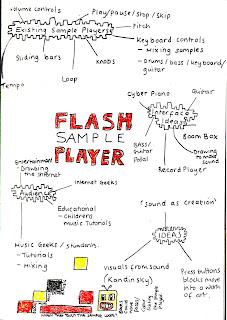
After doing the spider diagram I came to the conclusion that I didn't want to make a traditional flash player, but more like a sample player, with visuals. I will have to see if this is suitable for the brief before i look into it more. The main idea is that the keys on the keyboard will be connected to a sample sound. As the keys are pressed, a box will move on the screen. The visuals will then reflect the sound being made and vise-versa.

Monday, November 12, 2007

Project One: Behaviour and Response.

Brief

Create an interactive Flash-based sample player with original recorded sound.
Keywords: Human Computer Interaction (HCI), interface design, sound

Assessment Requirements:

• Upload the finished sample player on the Multimedia Student Server
• Online project journal entries
• Project evaluation (500 words, PDF format)

Handing in/upload date: 10/12/07 @ 10am

Research

http:/components.develpers4web.com/mp3-flash-player
This is the most standard flash player I could find.

The basic functions include:

+ Pause Button
+ Play Button
+ Stop Button
+ Skip Button
+ Volume Button
+ Left to Right Speaker Button
+ Toggle Repeat / Shuffle


Seeing With Sound


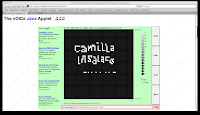
The website claims to provide vision for the totally blind.
I made my own name by using the white dots to create sound for my name. The sound produced was quite irritating and I'm not really sure how it can resemble the pattern.
This would not serve as an example of a sample flash player although I did enjoy the level of human interactivity and the links with the different shapes with the sound.

Andras Szonyi
This artist uses interaction for the purpose of art, with beautiful drawings linked with sound to create an unusual internet experience. I liked this idea and would like to incorporate art into my own interface rather than just creating a standard flash player with sliders and knobs.


Friday, November 09, 2007

Flash Sample Player Examples

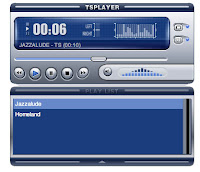
This was the flash player I liked the most, although couldn't actually use it until I had paid for it, which I was not going to do. The interface appeared to be quite well laid out with out overcomplicating the display and simple, sharp colours to make it appear sophisticated and professional.


Unlike the previous example this player appears instantly more cluttered and complicated for the user. However, it's target audience is for a more advanced musician, so I guess they would understand this more than myself.


I chose this as an example of a flash player I don't want to end up making. The design is simple, not to mention boring, and it had to connect to an separate audio player to play the selected track.


Useful Websites


Thursday, November 08, 2007

Interactive Design - Task 2 - Website Analysis

Spend sometime browsing the websites of IDEO, Sony & Apple. Do not
just look at the design (though that is useful); Look at the products they
are talking about and the philosophy of the design approach. Collect
together your favorites and discuss on your online journal

Think about a range of issues about the site:
What does it look like?
How easy is it to use?
How relevant is the content of the site?
How clearly the content is organised?

www.ideo.com


The first thing that stuck me about the IDEO site was the size of the site. It only filled one half of my screen, making navigation around the site more complicated that need be. Presuming it could be the Mozilla browser i was using, opened the site also in Internet Exploer and the sizing was even worse than before.

Mozilla Firefox:


Internet Explorer:


Besides from this, the website is very easy to use, containing useful information about the company. The website is full of visual examples, as well as written, with easy navigations through sideshows for pictures and drop-down menus.


www.apple.com 
Currently apple have upgraded the Tiger Systems to the new Leopard System on Mac OS X, and this is the first thing that shows up on the website. The tabs at the top of the site direct the customer to all the Apple products and the layout is the same as the tabs on a Mac, so PC users can get a feel for using a mac. Navigation around the site is easy, and stress free with the perfect amount of information about the products, and not too much about the history of Apple. The products are easy to find, with scrolling panels with pictures of the products too. 

Having recently purchased from the Mac site, I have to say that it is not the most simple ordering system. The Apple store constantly refreshes to become the US store (even though you have clicked UK many times) and when ordering an education discount you have to enter the name of the university and the city too many times to confirm on each product. Even then it decides to refresh back to the US site so all the prices are again in US Dollars rather than the British Pound. I found this quite frustrating but this was just the beginning. When trying to access the purchased items basket, the items in the account often disappeared, and when tracking the order once the items had eventually been purchased they didn't show up. I received an email saying the items would be delivered any time within the next two weeks, which was also frustrating as it meant I would have to stay in to sign for the packages. Overall I would find it much easier to order off a much simpler site rather than the Apple site itself.  

Tuesday, October 30, 2007

Mini Project

'Design a flash game that includes animation and sound, try and implement this in flash CS3'.

My expert knowledge on flash games probably isn't as good as it should be, I only really remember playing the old school games, such as tetris and pac man. So, to think of a simple idea for a game prooved to be quite a struggle for me.

My first idea was to have a stray leaf which is trying to get back to his home tree, and with monster children obsructing it's path. However, once i tried to create this I went off this idea quite alot.

The next idea was to create a game called 'Shooting Stars' based on the Milkyway Magic Stars.

How the game will work from the users point of view:
+ The first screen will be the loading page with the name of the game.
+ The second screen will be the game, and this will have a gun at the bottom which is controlled by the mouse, and / or the left and right arrow keys.
+ The stars will begin to fall, and each with a different personality will score different points.
+ The game is over when the stars hit the ground and the player has failed to shoot all the stars.

10 point = baby star
20 points = happy star
30 points = pop star
40 points = happy star
50 points = clever star
60 points = sporty star

(The names for all of these came from the back of the Milkyway Magic Stars packet).

What the computer needs to do:
+ Loading screen based on speed of users computer,
+ Load the second page automatically, or on mouse click,
+ Play sound when the game starts,
+ Link the mouse to the gun, or code to link to the left and right arrow keys,
+ Animate the falling stars randomly,
+ Gun on separate layer that shoots on click, or enter button,
+ When bullet shoots, if it hits one of the stars, they will explode,
+ If it misses then the star will fall to the earth and the game is over.
+ Display game over screen

Saturday, October 20, 2007

Practitioner Presentation

Klaus Obermaier

Obermaier's talents range from media-artist, director and composer creating innovative work in the area of dance, music, theatre and new media. Recent projects include interactive installations, video art, web projects, computer music, as well as large inter media outdoor events for ten thousands of people. His work is highly acclaimed by critics and audiences around the world.


His most famous work to date would be his collaboration with Ars Electronica and the Brucknerfest with a performance of Stravinsky's, Le Sacre du Printemps (The Right of Spring). The aim was to apply technology and creativity to an orchestra, and a dance performance to generate a complex means of computer generated expression.


Stravinsky's piece was composed before World War One and was expressing an ecstatic desire to experience the intensity of life. Obermaier reflected in his visualizations for the composition how easy it is to blur the line between the real, the virtual, the fact and the fake. Obermaier uses real-time stereoscopic projections to intensify the relationship between the dancer, the animated visuals and the audience in the provided stereoscopic glasses (an update of 3D glasses).


Overall, I have been inspired by Obermaier and would like to experiment with visualisations to create an atmosphere in small bars around Nottingham.

Friday, February 23, 2007

Website check for colourblind users

http://www.vischeck.com/

Usablity Seminar

www.playmonday.com

Use of text equivalents (think about your experience with Lynx).
The text was easy at first but it wasn't very easy to tell when you had changed pages

Ability to use the site without plugins (e.g. Flash) and Javascript. (Again, think about how easy/difficult it was to use the site in Lynx where these are not available).
Some parts of the site were not accessible such as the lottery numbers.

Ability to use the site with just the keyboard in Internet Explorer.
Colour combinations used on the site (think about how the site looked to people with colour blindness).

The colours were dull, but the site was still readable.

Colour contrast of the site (think about how the site looked to people with age related visual degeneration).
The contrast was really dark making it really hard to read from.

Ability to apply user settings to the site (think about how the site behaved when you tried to change the text size on the site, and the simulation of what happened when colour changes were applied)
The size of the links changed but not all the fonts in the lottery numbers and 'how to play' were still small.

Wednesday, February 07, 2007

Fast Exercise - Presentations

On the morning of our presentation we really thought that our presentation was going to be a failure, as two of our group members didn't turn up.

It came to about quarter past eleven, and everything that could have gone wrong had. The man from the windmill was meant to open for us so the school children could have the treasure hunt around the displays didn't turn up. Not that this really mattered anymore because the school children didn't either! Anyway, at about twenty past eleven Jools, arrived with about 20 other people from our class. Yes, there are people, but they aren't eight year olds that would benefit from the style of our presentation! Needless to say, we carried on as if they were this age, and it was really successful. Even though everyone in the group was over 18, they were excited about finding the dough people around the park. When everyone had found these people, we made everyone get in a circle and read out their clues on the dough people. Then we quizzed everyone on George Green's life, and they had to match their dough clue with the appropriate question. This worked well, and i could have seen it being a success with the children too!

Tuesday, January 23, 2007

Wednesday, January 10, 2007

An Incomplete Manifesto for Growth
http://www.brucemaudesign.com/index.html

Written in 1998, the Incomplete Manifesto is an articulation of statements that exemplify Bruce Mau's beliefs, motivations and strategies.

1. Allow events to change you. You have to be willing to grow. Growth is different from something that happens to you. You produce it. You live it. The prerequisites for growth: the openness to experience events and the willingness to be changed by them.

2. Forget about good. Good is a known quantity. Good is what we all agree on. Growth is not necessarily good. Growth is an exploration of unlit recesses that may or may not yield to our research. As long as you stick to good you'll never have real growth.

3. Process is more important than outcome. When the outcome drives the process we will only ever go to where we've already been. If process drives outcome we may not know where we’re going, but we will know we want to be there.

4. Love your experiments (as you would an ugly child). Joy is the engine of growth. Exploit the liberty in casting your work as beautiful experiments, iterations, attempts, trials, and errors. Take the long view and allow yourself the fun of failure every day.

5. Go deep. The deeper you go the more likely you will discover something of value.

6. Capture accidents. The wrong answer is the right answer in search of a different question. Collect wrong answers as part of the process. Ask different questions.

7. Study. A studio is a place of study. Use the necessity of production as an excuse to study. Everyone will benefit.

8. Drift. Allow yourself to wander aimlessly. Explore adjacencies. Lack judgment. Postpone criticism.

9. Begin anywhere. John Cage tells us that not knowing where to begin is a common form of paralysis. His advice: begin anywhere.

10. Everyone is a leader. Growth happens. Whenever it does, allow it to emerge. Learn to follow when it makes sense. Let anyone lead.

11. Harvest ideas. Edit applications. Ideas need a dynamic, fluid, generous environment to sustain life. Applications, on the other hand, benefit from critical rigor. Produce a high ratio of ideas to applications.

12. Keep moving. The market and its operations have a tendency to reinforce success. Resist it. Allow failure and migration to be part of your practice.

13. Slow down. Desynchronize from standard time frames and surprising opportunities may present themselves.

14. Don’t be cool. Cool is conservative fear dressed in black. Free yourself from limits of this sort.

15. Ask stupid questions. Growth is fueled by desire and innocence. Assess the answer, not the question. Imagine learning throughout your life at the rate of an infant.

16. Collaborate. The space between people working together is filled with conflict, friction, strife, exhilaration, delight, and vast creative potential.

17. ____________________. Intentionally left blank. Allow space for the ideas you haven’t had yet, and for the ideas of others.

18. Stay up late. Strange things happen when you’ve gone too far, been up too long, worked too hard, and you're separated from the rest of the world.

19. Work the metaphor. Every object has the capacity to stand for something other than what is apparent. Work on what it stands for.

20. Be careful to take risks. Time is genetic. Today is the child of yesterday and the parent of tomorrow. The work you produce today will create your future.

21. Repeat yourself. If you like it, do it again. If you don’t like it, do it again.

22. Make your own tools. Hybridize your tools in order to build unique things. Even simple tools that are your own can yield entirely new avenues of exploration. Remember, tools amplify our capacities, so even a small tool can make a big difference.

23. Stand on someone’s shoulders. You can travel farther carried on the accomplishments of those who came before you. And the view is so much better.

24. Avoid software. The problem with software is that everyone has it.

25. Don’t clean your desk. You might find something in the morning that you can’t see tonight.

26. Don’t enter awards competitions. Just don’t. It’s not good for you.

27. Read only left-hand pages. Marshall McLuhan did this. By decreasing the amount of information, we leave room for what he called our "noodle."

28. Make new words. Expand the lexicon. The new conditions demand a new way of thinking. The thinking demands new forms of expression. The expression generates new conditions.

29. Think with your mind. Forget technology. Creativity is not device-dependent.

30. Organization = Liberty. Real innovation in design, or any other field, happens in context. That context is usually some form of cooperatively managed enterprise. Frank Gehry, for instance, is only able to realize Bilbao because his studio can deliver it on budget. The myth of a split between "creatives" and "suits" is what Leonard Cohen calls a 'charming artifact of the past.'

31. Don’t borrow money. Once again, Frank Gehry’s advice. By maintaining financial control, we maintain creative control. It’s not exactly rocket science, but it’s surprising how hard it is to maintain this discipline, and how many have failed.

32. Listen carefully. Every collaborator who enters our orbit brings with him or her a world more strange and complex than any we could ever hope to imagine. By listening to the details and the subtlety of their needs, desires, or ambitions, we fold their world onto our own. Neither party will ever be the same.

33. Take field trips. The bandwidth of the world is greater than that of your TV set, or the Internet, or even a totally immersive, interactive, dynamically rendered, object-oriented, real-time, computer graphic–simulated environment.

34. Make mistakes faster. This isn’t my idea -- I borrowed it. I think it belongs to Andy Grove.

35. Imitate. Don’t be shy about it. Try to get as close as you can. You'll never get all the way, and the separation might be truly remarkable. We have only to look to Richard Hamilton and his version of Marcel Duchamp’s large glass to see how rich, discredited, and underused imitation is as a technique.

36. Scat. When you forget the words, do what Ella did: make up something else ... but not words.

37. Break it, stretch it, bend it, crush it, crack it, fold it.

38. Explore the other edge. Great liberty exists when we avoid trying to run with the technological pack. We can’t find the leading edge because it’s trampled underfoot. Try using old-tech equipment made obsolete by an economic cycle but still rich with potential.

39. Coffee breaks, cab rides, green rooms. Real growth often happens outside of where we intend it to, in the interstitial spaces -- what Dr. Seuss calls "the waiting place." Hans Ulrich Obrist once organized a science and art conference with all of the infrastructure of a conference -- the parties, chats, lunches, airport arrivals — but with no actual conference. Apparently it was hugely successful and spawned many ongoing collaborations.

40. Avoid fields. Jump fences. Disciplinary boundaries and regulatory regimes are attempts to control the wilding of creative life. They are often understandable efforts to order what are manifold, complex, evolutionary processes. Our job is to jump the fences and cross the fields.

41. Laugh. People visiting the studio often comment on how much we laugh. Since I've become aware of this, I use it as a barometer of how comfortably we are expressing ourselves.

42. Remember. Growth is only possible as a product of history. Without memory, innovation is merely novelty. History gives growth a direction. But a memory is never perfect. Every memory is a degraded or composite image of a previous moment or event. That’s what makes us aware of its quality as a past and not a present. It means that every memory is new, a partial construct different from its source, and, as such, a potential for growth itself.

43. Power to the people. Play can only happen when people feel they have control over their lives. We can't be free agents if we’re not free.

George Green

We have been asked to produce a site specific live art performance event in 21 days. The event will be based on George Green, a profound mathematician / physicst from Nottingham.


After researching essays and books in the library we found out that George Greens father built a windmill in Sneinton. Today we visited the windmill, and here are a few photographs.


Tuesday, January 09, 2007

The National Space Centre Visit

Choose an interactive display that you found exciting and engaging at the Space Centre.
The display which stuck in my mind after the visit is the rows of Heinze baked bean cans.
Describe the elements in the display and say why you found it so exciting and engaging.
I found it quite interesting because each baked bean cans weight was relative to the planet it was on.

How successful were these interactive multimedia elements?
The display didn't include multimedia elements as such, but it was interactive and informative to the visitors of the Space Centre.

Now choose an interactive display that you did not find is engaging at the Space Centre.
The display where you lay on a skateboard looking slide. The camera then takes a photograph of this to show you what you would look like if you were moon walking. The idea is quite fun, however the result didn't look overly pleasing. However, for its intended young audience I don't think they would be worrying about the quality of the photograph. It was fun and easy to use, however the child would probably need to the instructions explained to them because they were quite confusing.

Monday, January 08, 2007

Group 8 - 2 Minute Film - Evaluation

'Highlight the skills and knowledge you have gained and developed and show how you have gained them. Provide suggestions for improvement and how these attributes will inform your study in future modules this year'.
Proir to making our two minute Film 'The Death of Office Man' for the narratives module, I had not really done much group work in this way. In the past most of the work I have done involved individual work and then group crits on my own work and other peoples. This meant that when working on 'The Death of Office Man' I became aware of my actions and role in the group and how I came about resolving any problems that occured. Making this two minute film has benefitted my team working abilities, but also my techincal skills in the production process.

In the first stages of making our film we were throwing around various ideas. We didn’t want to rush this stage because this is the main basis for our film, so if this went wrong, so would the rest of our film. Slowly we realised that because we didn’t know each other that well, some good ideas weren’t understood. To resolve this problem we went for a ‘Group 8 Big Breakfast’. This helped us get to know the different personalities in our group so we could put together a solid idea. Through many group meetings, the forum, talking over the internet and texting each other ideas began to come together as we got to know each other. As a group we decided on a few initial ideas for our two minute film. One idea was based around hierarchy in the workplace. We liked the idea of juxtaposing scenes and different points of view portrayed of a character in each scene.1 Our groups technical abilities seemed to split. Chris and Adam were particularly interested in animation and Glyn and I that are into video production, so we thought we could combine this for the final film.Another idea was based around the idea of war, but this was quickly dismissed as the idea developed because it would have been impossible to film in the time and money that we had. Looking back I learnt that more should hav been discussed before deciding on an idea, and we should have looked at more films that related to our idea.

Once we had our idea we decided as a group to individually draw up a storyboard. The main reason for this was to make sure we all thinking along the same lines. The results were as we expected and all the storyboards ended up looking similar. However, looking back with the time that we had we could have each been thinking about differnt areas of our production and when it came to put it all together we would have had much more all detailed idea. This time was not completely wasted, and after this slow process things started to speed up. Glyn and I decided what equipment we would need, and Chris and Adam began to draw their animation ideas. I also began to write down what props we would need for our production, and what we would each need to organise by the filming the next week. This helped me become more motivated in the group and ready to put our ideas into practice.

Beofore filming I was quite nervous because none of us were particularly experts in the studios. However, when we all got together we seemed to work well. We all shared tasks and roles in the studio, none of us were particularly controlling. Even though Glyn was acting he still helped with decisions about lighting, camera work and other small decisions we had to make. The lighting was quite problematic to start with because we all wanted our film to start of in daylight and as the day passed for the lighting to get darker. This didn’t really work because the day lighting looked much harsher and just generally bad. Slowly, and after a big breakfast we resolved the problem that we were having by pointing the lights up to the mirrors around the lights on the ceiling so it bounced back down in a less harsh way than before. We found this looked much more natural and we were happy with the outcome on the camera. However, once we filmed what we thought was a good first half of our filming we had a break. When we got back, we looked at our footage and seemed to take most of the shots again. The change was noticable with the lighting and differnt camera angles, but it looked much better. We started to become more creative whilst we were combining our skills, and we ended up making some stop motion video with the items on the office desk each appearing one by one. This idea wasn't initially in our storyboard but we all thought it looked much better than our original idea which was just a series of zooms and close up of the office items.

Post production is the area I was particularly looking forward to in this project, but it was the most problematic area of our film. Mostly because of technical difficulties concerning hard drives and the compatibility on the computers and also with the computers matrox card. However, we managed to resolve these and our film came together quite quickly. I had done quite alot of editing before on Adobe Premiere, so I didn't want to take over with the editing. I took the role as the decision maker alongside either Chis, or Glyn when they were editing. Adam had not had much experience with Adobe Premiere and wasn't keen to learn at this stage. We were ahead of schedule because our filming was much quicker than we expected.

Once we had the rough edit done, we soon realised we needed some sound. For the sound we decided that we would like to have general office noice, such as, printing, scanning, coughing and general mumblings. So even though our sound was non-diegetic, we wanted it to sound diegetic to give the illusion that our character was actually working in an office. Glyn and I went to the printing shop in the Student Union and kindly asked if we could record sounds, they were more than happy to help and we used these in the final piece. We also went to the library to get random typing noises and coughing, and we then recorded our own key pieces of sound. Overall i was not entirely happy with the sound because I think alongside it we would need some kind of soundtrack because our film doesn't seem to pick up pace, or flow as much as I would have liked it to. However, none of us were musicians, and we would have liked to have used some one elses music, but due to copywrighting laws we didn't follow through with this idea. If given another chance I would have arranged with one of my talented friends at the beginning of the production and asked them to produce a piece of music to go with our idea.

As Chris was putting the animation together, I decided that we needed some kind of introduction to our film, which was in a similar style. The idea came to me in a dream, which sounds weird, but it got me motivated to make something a little bit different. I told Glyn about the idea and he was adamant that i watched the title sequence of Napolian Dynamite because it sounded like it would help me. I loved the way that the title sequence was made and it was quite similar to my idea. However, I wished that I had more time to work on my idea because the title and credits were not something we were thinking about when planning our ideas in the beginning. My first idea for the title sequence was to do a stop motion sequence using pens to spell out the title of our film. However, when i tried to make this, I didn't have enough pens for the whole title and it was hard to squeeze it all in. Instead, I decided to use paperclips and this worked alot better. The idea for the credits kind of just came to me as I was making the title sequence, and I was quite pleased with the way it turned out.

Overall, I have learnt quite alot from this production, especially about team work. Our group seemed to work better when we assigned each people seperate areas to work on and then put them together to see what works and what doesn't work. Since making the film I have been alot more aware of film title sequences, for example in Casiono Royal with the playing cards. It has made me think more about it as an option for something I would like to experiment with in the future, either from the animation side, or from the filming perspective.

1Camilla Insalaco, Online Journal http://camillainsalaco.blogspot.com/

Broadway Cinema

The screeening for all our two-minute film was exciting. I've never had work that I've done been any where near a cinema!

The films were really impressive, and most used animation techniques.

When our film played it was clear that we needed some kind of sound in the title sequence and the credits. I felt ours needed more work and it was slightly dissappointing, but I guess thats a lesson learnt for next time.

Monday, November 27, 2006

Flash

The tutorials were slightly confusing, but slowly after both seminars I began to understand the software and found it quite exciting. I managed to make an animation of a square, turning into a circle. For many this would probably be a simple task, but as I have never used this before it was quite tricky for me. I feel that there is so much more to learn in Flash, so I may have to teach myself.

Thursday, November 16, 2006

Narratives - Group 8

Group 8’s Meeting in Production Surgery

To make our 2 minute film a combined effort we decided to go off and produce individual storyboards of the ideas we had. In the production surgery we put all our ideas together and as we had hoped the storyboards were quite similar, so this meant we were all thinking along the same lines. Once we realised this we all took control of making this actually work. Glyn and I decided to book all the equipment whilst Adam and Chris talked about their ideas for their animation section.

Group 8’s First Day Filming

To be honest I was quite nervous because none of us were particularly experts in the studios. However, when we all got together we seemed to work well. We all shared tasks and roles in the studio, none of us were particularly controlling. Even though Glyn was acting he still helped with decisions about lighting, camera work and other small decisions we had to make.

Group 8’s Problems with Lighting

The lighting was quite problematic to start with because we all wanted our film to start of in daylight and as the day passed for the lighting to get darker. This didn’t really work because the day lighting looked much harsher and just generally bad. Slowly, and after a big breakfast we resolved the problem that we were having by pointing the lights up to the mirrors around the lights on the ceiling so it bounced back down in a less harsh way than before. We found this looked much more natural and we were happy with the outcome on the camera. It would have been more useful to have had Deborah and Danny’s seminar on lighting before we actually filmed, because I think now we could have sorted out these problems much quicker. I guess you learn by making mistakes though?!

Group 8 Getting Excited after a Big Breakfast

Before breakfast/brunch/lunch/dinner (it seemed to be a different thing for all of us as our body clocks are completely messed up) we filmed what we thought was a good first half of our filming. When we got back, we looked at our footage and seemed to take most of the shots again, and the difference with the lighting and camera angles is much more noticeable and looks much better. We started to become more creative whilst we were combining our skills, and we ended up making some stop motion video with the items on the desk each appearing one by one. I loved this when we looked back on it and, although some of the timing was wrong so we will have to sort that out in post production.

Interactive Narrative - Javascript

Before I started this course I had no idea what 'Javascript' was, or what 'Programming' was but now I feel like i have learnt something new. I had only really had such basic knowledge of it from doing a few bits and pieces on Myspace. In the first week I learnt that 'Action Script' was different to 'JavaScript' and 'Java'. I also learnt Internet Explorer is not good to use when testing programming and that Firefox is better.

The Project

To take photographs of our favourite place in Nottingham.
As I don't have a favourite place in Nottingham yet, I got stuck for with ideas. However, after watching Jeunet and Caro's 'Delicatessen' I quickly became inspired by the DVDs menu sequence. It had a very 'french' feel about it from the warm colours used and the french items on the table. It was very user friendly and each object lead performed a particular command. I enjoyed this interractivity and wanted to create something similar for my interactive narrative project.

I took photographs of the 'French Living' resaurant/delicatessen in Nottingham. I explored every aspect of the place by taking photographs from all diffent angles, both wide and close-up. It was quite interesting seeing the photographs back because there were so many it seemed like I could put them all together and there would be a 3-Dimensional model of the restaurant! However went back to my original idea because I wanted the photographs to act as a journey through the resaurant.

First of all I had a few problems with re-sizing the photographs to the required pixel measurements. The 800 wide x 350 high made my photographs too rectangular when the objects in the photos were square. To resolve this problem I had to resize all the photographs to a size which would suit the photographs themselves which was 426 wide x 350 high.

I then found it quite easy & satisfying to link all the photographs together in Dreamweaver. I made one main wide angle photograph the 'home' where all the photographs eventually lead back to after exploring the menu, the sign, the plant pot, the food counter and the table and chairs. It was quite hard to add the different javascript codes because it all had to be put onto the right photographs. After a long struggle I resolved the problems, and everything worked, until the final critique when for some unknown reason none of the photographs linked up. This was quite annoying because I couldn't find out why it suddenly changed after it was all working fine. Eventually I managed to find a previously saved copy where everything linked up fine, so overall I was pleased with my interractive narrative project.

improve my project I would have liked to make the colours of the photographs warmer like the colours used in 'Delicatessen' so it appears to have more of a French feel to it. It may also look more pleasing if the I drew on top of the photographs so they had more of a handmade feel to them like the menu sequence in Delicatessen. I would also like to have some Freanch music accompanying the intrerractive narrative to make the French theme more noticable and believable.

Saturday, November 04, 2006

Image, Meaning and Composition Blog Assignment

Functionality
A lamp to light up my room everytime I turn it on.

Aesthetic Beauty
The lamp has two spinning layers. The outer layer is transparent with two images of superman on it, one where he is being heroic breaking out of chains and in the other superman is flying through the air. In the layer behind there is a cityscape of Metropolis

Communication
The lamp reminds me of my childhood and what its like to be young again. People say that to be happy is to be mindless and thats kind of what the lamp suggests.

Decorative / Entertainment Value
The lamp is more of a distraction from any entertainment in my room because people end up getting really transfixed by it.


Friday, November 03, 2006

Narratives - 2 Minute Film - The Plot

At the beginning of the meeting we had quite a few exciting ideas being thrown around based on the theme of hierarchy. Initially our favourite was an idea for our film to be based around the topic of War. The more we talked about this idea we decided that practically it would not be the easiest choice to make because it would take a lot more time than we actually have. Some other ideas were based around hierarchy in prison, in schools and in the office. The office had been coming up a lot and we thought that this was a good basic idea which we could begin our planning for.

Plot Outline

Our character is a business man, well dressed in a suit ready for his day at work. A wide angle shot will show his luxurious office space which is neat, tidy and organised. We intend to have big close up shots of his luxury items such as flowers, coffee maker and most importantly a photograph of our character with the rest of his family. This moment of serenity is interrupted by an email alert from the boss pressuring our character. To represent the boss we intend to use non-diegetic sound saying 'you have e-mail' or to find an AOL e-mail alert and use diegetic sound. As the email alerts from the boss get more frantic, so do the calls on the mobile phone from our characters family. Piles of paper begin to pile up and up and up causing our character to not return home to his family due to his increasing work load. Using a flash animation we intend to show the hierachy ladder of the work place, and the ladder for the family. Quickly the work ladder dominates the family ladder. To show time passing by we hope to use time-lapse-photography on the hands of a clock whilst our character begins to grow a beard and sweat under the pressure from his boss. Slowly, but obviously the walls will close in on our character as if there is no escape. The luxury items from the beginning of the film are now non-existent and his family portrait has been forced on to the floor due to lack of space in our characters claustrophobic office space.